Smart Remote - Easy TV Control
- 4.2
- Rating
- 5.00M
- Installs
- Free
- Price
 Analysis by App-foxy
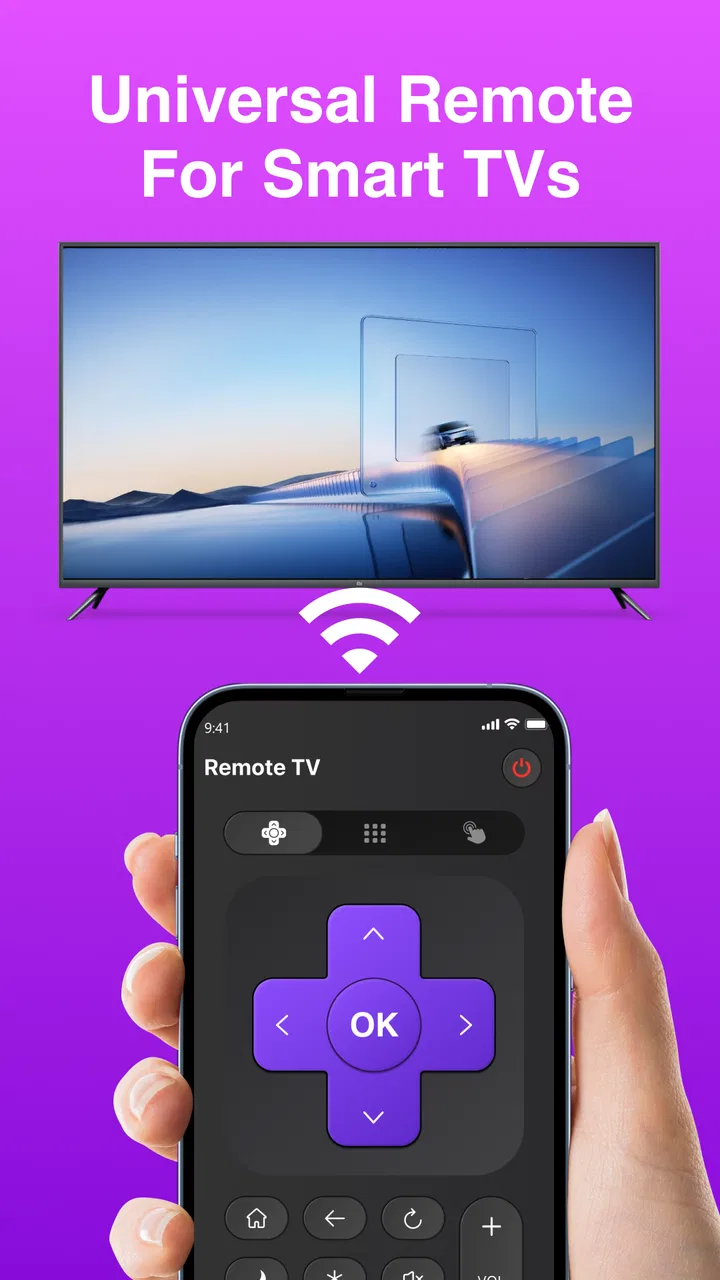
I tested Smart Remote - Easy TV Control as the kind of tool you notice most when the physical remote has disappeared under a sofa cushion. It is a free Android utility from Figuredin, built around a straightforward idea: use a compatible phone as a way to control a Smart TV. That sounds simple, and the app’s appeal is precisely that it does not ask you to learn a complicated entertainment system before you can try it.
In my experience, the app makes the most sense in a shared home. A television may be used by several people, while the remote is often in the hands of whoever watched last. Having a phone-based alternative can make a difference when someone wants to pause a program, change the volume, or navigate a menu without searching through every room. The useful part is not replacing every remote permanently; it is having a practical backup ready when the household needs one.
Smart Remote - Easy TV Control sits in the Tools category, and that description fits better than treating it like a media app. It does not try to become a streaming service or a content library. Its job is control, so I judged it mainly on how quickly it gets out of the way and whether it feels sensible when more than one person is using the same television.
You May Also Like

 Blood Strike: 2.5 Anniversary
Blood Strike’s Loadouts Turn Every Drop Into a Tactical Gamble
A close look at Blood Strike’s custom loadouts: how fast access to signature weapons reshapes its battle royale rhythm, rewards preparation, and narrows the gap between fights.

 Pandora - Music & Podcasts
Pandora’s Music Is Easy to Start, but Harder to Recover
Pandora’s strength is its low-effort path from a seed to a station. Its weak spot is how much confidence it asks you to place in connection, setup, and quiet recovery.

 8 Ball Pool
 Is Built on Rivalries, Rematches, and Routine
A close look at the rivalries, rematches, shared routines, and unanswered safety questions that turn a quick pool match into a persistent mobile community.

 Samsung Music
’s Quiet Strength Is Playing What You Already Own
Its reach comes less from spectacle than from dependable access to a personal library. That simplicity is both the app’s strongest retention engine and its ceiling.

 AccuWeather: Weather Radar
AccuWeather Review: A Quick, Clear Forecast for Everyday Decisions
For everyday plans, the best forecast is the one you can understand quickly. AccuWeather makes rain timing, radar, and local conditions easy to act on, with a few trade-offs.

 Hill Climb Racing
Why Hill Climb Racing Still Turns Crashes Into One More Run
A tiny car, a bumpy hill and one more upgrade: Hill Climb Racing keeps resurfacing because its simple chaos makes every near-miss feel personal.
More From Our News Desk



How it fits into a shared living room
A realistic example is a family or group of roommates settling down for the evening. One person has the television remote, another is holding the phone, and a third wants the volume adjusted without interrupting the program. In that moment, a phone remote can be more convenient than passing around a small plastic controller. It also helps when the original remote is temporarily unavailable, has low batteries, or has been left beside a different television.
The shared-device angle also reveals an important limitation: the phone is personal, but the television is communal. A physical remote normally stays associated with the room. A mobile remote stays with its owner, which means the person who installed or opened the app may become the unofficial controller. That can be convenient, but it can also create awkwardness if everyone assumes somebody else is handling the next action.
I would therefore use it as a cooperative tool rather than as a replacement for household communication. If one person is watching, it is simple enough to hand over the phone or make the adjustment requested. If several people are trying to control the screen at once, the experience depends more on coordination than on the app itself. Agreeing who is operating it avoids the small but real frustration of competing instructions.
This is especially useful in homes where children, visitors, or older relatives may not always know where the physical remote is. The app gives another route to basic television control without requiring the household to buy another accessory. At the same time, I would not assume that every visitor should immediately use the phone. The owner may prefer to keep control of the device, particularly when the television is connected to personal accounts or paid services.
Getting started without overcomplicating the room
The first thing I would check is compatibility between the phone, the television, and the home network. A Smart TV remote app generally relies on the television being reachable from the phone, so both devices need to be in a suitable connection environment. If the television cannot be discovered, the problem may be the network arrangement rather than the remote interface itself. This is worth checking before repeatedly tapping buttons or reinstalling the app.
Smart Remote - Easy TV Control requires Android 11 or later, which gives it a clear boundary for older phones. That is not a problem for someone using a recent handset, but it matters in a household where an older spare phone is kept in a drawer specifically for shared use. Before choosing that device as the permanent remote, I would confirm that it can install and run the current version, 1.4.7.
My preferred setup is to begin with the television already switched on and the phone connected to the same normal home network used by the other household devices. I would keep the physical remote nearby during the first attempt, because a phone remote is not much help if the TV needs an initial confirmation and the original controller has been put away. Once the connection works, the spare remote can return to its usual place.
There is a useful distinction between setup ownership and daily use. The person who installs the app may be the one who understands the initial connection, but that does not mean they need to control the television every evening. In a shared home, I would explain the basic controls to other users and decide whether the phone should be passed around or remain with one agreed operator.
Another practical tip is to avoid testing the app for the first time during a time-sensitive moment, such as the start of a live event or when someone is already waiting for a program. Try it earlier, while the physical remote is still available. That small bit of preparation turns the app from an uncertain emergency solution into a dependable backup.
What coordination looks like in everyday use
Phone controls can feel more personal than a traditional remote because they are hidden behind a screen that may also show notifications, calls, and other distractions. When I use a mobile remote in a shared setting, I prefer to keep the phone on the control screen rather than switching between applications after every command. This reduces accidental taps and makes it obvious that the phone is being used for the television.
It also helps to say out loud what is happening. “I’m lowering the volume” is clearer than silently pointing a phone at the screen, especially when several people are watching. That may sound minor, but shared devices work better when control is visible. A household does not need a formal rulebook; it just needs to avoid two people reaching for control at the same time.
If a child asks to use the app, I would treat the phone and the television as separate responsibilities. The app is rated Everyone, so its age classification is broad, but that does not automatically mean every child should have unrestricted access to the phone that runs it. The more important issue is whose device is being used and what else is accessible from that device. I would let a child adjust the television with supervision when appropriate, rather than handing over a personal phone without considering the wider context.
The same principle applies to guests. A visitor may only need help changing the volume or switching inputs, but giving them a phone that is signed in to personal services is a different decision. In my view, the safest household habit is to keep the remote function available while retaining control of the phone itself. Smart Remote - Easy TV Control can assist with the television without changing who owns the phone or who decides what happens on the screen.
Boundaries around accounts and personal phones
A remote app should not be confused with a shared television account. It controls the screen; it does not make every viewer an owner of the streaming profiles, subscriptions, or settings already present on the TV. That distinction matters in a family home. Someone can be allowed to pause or adjust volume without being given permission to open personal content or change account-related choices.
I found this boundary useful when thinking about household routines. A parent might keep the app on a personal phone but use it to help a child from across the room. Roommates might agree that one person handles navigation while everyone else chooses what to watch verbally. Couples might install it on both phones as a backup, while still deciding who changes settings. These are social arrangements rather than app features, but they determine whether the tool feels helpful or intrusive.
For a shared spare phone, I would keep its purpose narrow. Install only the remote utility that the household actually needs, avoid treating the device as a general-purpose shared account, and store it in a known place. This makes the phone easier to find and reduces confusion about who should use it. The app works best when its role is obvious: television control, not a substitute for a family device policy.
There is also a privacy habit worth keeping in mind: do not leave a personal phone unlocked and unattended simply because the remote screen is open. Anyone who picks it up may be able to move beyond the remote interface into the rest of the handset. The app itself may be simple, but the phone remains personal. I see that as a reason to use a spare device or keep the handset in the owner’s possession, not as a reason to avoid the app entirely.
Where it beats the usual alternatives
The most obvious alternative is the television’s original remote. That remains the better choice for people who want a dedicated controller that can stay beside the screen and be used without unlocking a phone. It is also more natural for guests and older users who do not want to navigate a mobile interface. Smart Remote - Easy TV Control is strongest when the original remote is missing, inconvenient, or shared unevenly.
Another alternative is the manufacturer’s own television control app. That option may be preferable for someone who wants a broader ecosystem experience or already uses a brand-specific mobile setup. A dedicated brand app can feel more integrated when a household owns several products from the same manufacturer. On the other hand, a simpler third-party tool may be more attractive to someone who only wants basic remote access without building a larger device-management routine.
There are also inexpensive replacement remotes and universal remotes. Those are better for a communal room where nobody wants to depend on one person’s phone. They can remain permanently available and do not compete with calls, messages, or low battery concerns. The trade-off is that a replacement remote has to be bought, stored, and sometimes configured, while this app is free to try and uses hardware already in the home.
My practical recommendation is to pair the app with the physical remote rather than choosing one forever. Keep the physical controller as the shared default, and use the phone app for moments when the remote is misplaced or when a particular person needs control from another seat. That arrangement avoids making the app responsible for every household situation while still giving it a clear purpose.
Small strengths that matter more than they seem
One strength is accessibility through familiarity. Most people already know how to wake and use their own phone, while a television remote can have tiny buttons or confusing labels. The app may be easier for a person who is comfortable with touch controls but struggles to remember which physical button opens a menu. It is not automatically better for everyone, but it changes the learning curve for the right user.
A second strength is recoverability. When the physical remote is lost, the household often spends more time searching than the task deserves. Having a remote utility installed in advance means the solution is already in the home. This is why I would install and test it before an emergency, not after the controller has vanished.
A third insight is that the phone can make control more deliberate. With a physical remote, it is easy to press several buttons quickly while looking at the screen. On a phone, I tend to pause and confirm what I am touching. That can be useful when navigating menus, although it may feel slower for someone who is accustomed to rapid button presses.
The trade-off is that the app cannot remove every source of friction. The phone needs power, the user needs access to it, and the television needs to be reachable in the expected way. A physical remote is independent of those phone habits. If the household wants a controller that anyone can grab instantly, a dedicated remote remains the more dependable centerpiece.
Who should install it, and who should skip it
I would recommend Smart Remote - Easy TV Control to someone who regularly misplaces a television remote, shares a living room with several people, or wants a no-cost backup on a compatible Android phone. It is also a sensible option for a person who prefers touch controls and does not mind using a personal device for occasional television tasks.
I would be more cautious about recommending it as the only controller. Homes with many visitors, children who frequently use the television unsupervised, or people who dislike handing over personal phones may be happier with a physical replacement remote. The same is true for anyone using an older Android handset that cannot meet the operating-system requirement.
It may also be the wrong choice for a viewer who expects every advanced television function to feel identical to the manufacturer’s original controller. A simple remote utility is appealing because it stays focused, but that focus can mean a dedicated brand solution or physical controller is more suitable for specialized routines. I would choose based on the controls the household actually uses, not on the promise of replacing every device in the room.
The app’s public reception is encouraging: it holds a 4.3 average from around 63 thousand ratings, alongside more than a thousand written reviews and over five million installs. Those figures suggest that the basic idea has reached a substantial audience, but they should not replace a compatibility check in your own home. A remote app can be well received and still be a poor fit for a particular television, network arrangement, or shared-device habit.
My household verdict after using it
Figuredin has kept the product’s identity clear: this is a free Tools app for controlling a Smart TV, not an overloaded entertainment hub. I like that clarity. The current version, 1.4.7, is the one I would try on a supported Android phone, preferably after testing it at a calm time with the original remote close by.
My final view is that Smart Remote - Easy TV Control earns its place as a backup and shared-use convenience. It is particularly useful when the room has one missing remote but several people who need occasional access. Its main weakness is not that it is complicated; it is that a phone is still a personal object, and a shared television sometimes needs a controller that belongs to the room.
For a household that agrees who operates the app, keeps account boundaries clear, and prepares the connection before it is urgently needed, I think it is worth trying. For a household wanting a permanently communal, always-ready controller, I would keep the physical remote or choose a dedicated replacement instead. My recommendation is simple: install it as a tested fallback, then let your household decide when the phone is more convenient than the remote on the table.
FAQs for Smart Remote - Easy TV Control
01What devices are compatible with Smart Remote - Easy TV Control?
Smart Remote - Easy TV Control is compatible with a wide range of smart TVs and streaming devices. It supports popular brands like Samsung, LG, Sony, and Roku. Before downloading, check if your specific TV model or streaming device is listed in the app's compatibility section to ensure seamless integration.
02Do I need an internet connection to use Smart Remote - Easy TV Control?
Yes, an internet connection is typically required for Smart Remote - Easy TV Control to function properly. The app often uses Wi-Fi to connect with your smart TV or streaming device. Ensure that both your smartphone and TV are connected to the same network for optimal performance.
03Is Smart Remote - Easy TV Control free to use?
Smart Remote - Easy TV Control offers a free version with basic features, but there may be in-app purchases or a premium version available. The paid options often include additional functionalities, such as ad removal, customizable controls, or enhanced support for multiple devices.
04How easy is it to set up Smart Remote - Easy TV Control?
Setting up Smart Remote - Easy TV Control is designed to be user-friendly. Once downloaded, the app guides you through a simple setup process. Typically, it involves selecting your TV brand and connecting through your Wi-Fi network. The app provides clear instructions, making it accessible even for non-tech-savvy users.
05What kind of support does Smart Remote - Easy TV Control offer?
Smart Remote - Easy TV Control provides support through various channels, including an in-app help section, FAQs, and customer service via email. Some versions may offer live chat or phone support. This ensures users can easily get assistance for any technical issues or questions about the app’s functionalities.
Pros
- User-friendly interface for easy navigation.
- Supports a wide range of TV brands.
- Quick setup with step-by-step guide.
- Customizable remote layout options.
- No need for multiple physical remotes.
Cons
- Requires stable Wi-Fi connection.
- Limited features in free version.
- Ads can be intrusive at times.
- Not compatible with all TV models.
- Occasional connectivity issues.

Smart Remote - Easy TV Control
Gallery